
Troubleshooting Guide
This guide will take you through solutions to the most common problems people have when using Natro Macro.
Most problems can be resolved by following the steps in this guide, so please follow each step carefully.
Step 1
Use the latest version of Natro
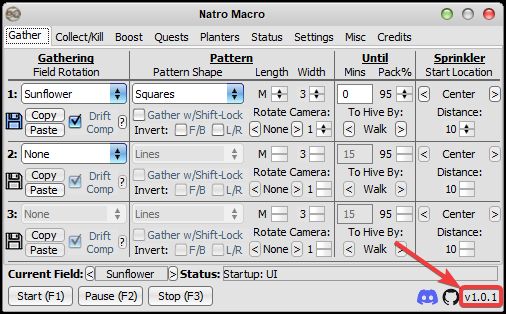
You can see your current version in the bottom right hand corner of Natro. If you haven't already, grab the Newest (Fixed) Version below for the latest features and bug fixes.
Step 2
Check your Windows settings
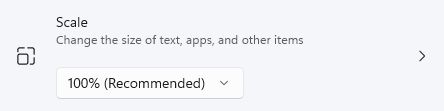
Set scale to 100%. To do this right click your desktop, click Display settings, and change it, even if Windows recommends another %.
There's multiple resolutions that will work, but its recommended to use a standard 16:9 resolution ranging from 1366x768 to 1920x1080 to avoid detection issues. If you have multiple monitors, apply this to whichever one Roblox launches on.
If your mouse is set up for the left hand, switch it back. Settings > Devices > Mouse > Primary button > Left.
If your device has a touchscreen, disable it so Roblox behaves properly. Press Win+S, type "Device Manager", open Human Interface Devices, find "HID-compliant touch screen", right click it, then Disable.
If Roblox thinks you got a touchscreen it will force camera to be on follow for whatever reason.
Step 3
Roblox settings
- Camera mode: Classic (Inverted off)
- Movement mode: Keyboard (Shift Lock Switch on)
- Experience and Roblox language: English. The honey count at the top of your screen should read "Honey"
- Text size bar: empty, no bars filled
- Performance Stats and Micro Profiler: off
Step 4
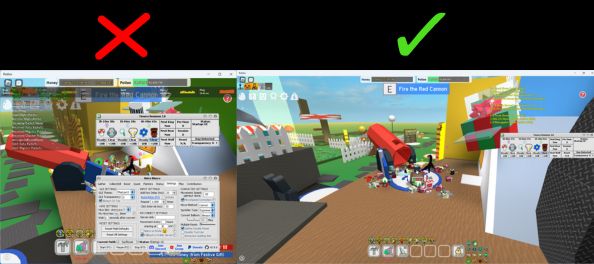
Nothing blocks your screen in-game
Alot of the macro relies on image detection, the red cannon, hive conversion, movespeed, so it is important your screen stays clear.
- If chat is overlapping the cannon, resize your Roblox window.
- Turn off "Always on top" in Natro's settings tab.
- If you want planter timers open, keep them under the chat window and not covering the lower half of the screen.
Step 5
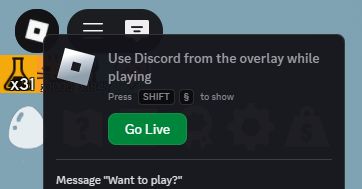
Discord Game Overlay
Discord's game overlay can appear over parts of your screen when you get a message, and this throws off detection. Turn it off in Discord Settings, Game Overlay, by disabling both "Enable Overlay" and "Enable Legacy Overlay".
Step 6
Graphics modifiers
Turn off any Windows or external graphics modifiers, graphics card enhancements, Windows HDR/accessibility settings, Bloxstrap, custom fonts, lighting or image mods, all of it. These interfere with image detection and can cause the macro to not stop at the cannon, reset at hive, misread quest tasks, or miss planters.
Step 7
Check for lag
Low or inconsistent FPS and server lag can throw off movement. This can result in missed fields, questgivers or hives, and misplaced "phantom" planters.
- FPS: use Shift+F5 in-game, aim for 25+ and consistent.
- Ping: check with Roblox's performance stats. Try a server with lower ping, use a private server from your region and restart it regularly, or switch from Wi-Fi to ethernet.
Remember to turn the FPS counter and performance stats back off once you are done checking.
Step 8
Set your preferred Roblox version
There is a web browser version and a Microsoft Store version of Roblox. Having both installed can cause "You don't have permission to join this experience" errors when the macro reconnects. Pick only one, set it as your default in Windows, or uninstall the other one.
Step 9
Roblox avatar
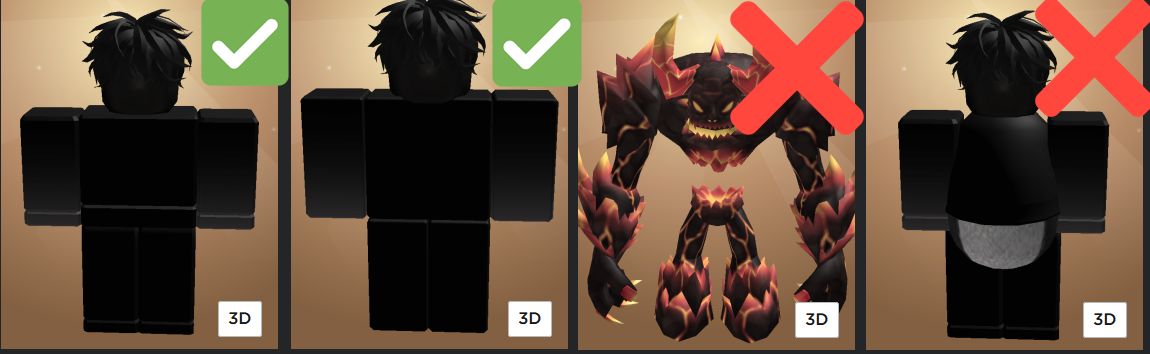
Make sure your Roblox avatar is normal-sized and that you are not using an Rthro package. This includes parts of Rthro packages. R6 and R15 should both work, along with the default Roblox body packages (such as Boy, Robloxian 2.0, or Woman).
Other helpful resources ig
A few more guides for specific problems not covered above:
- How to create a webhook reporting on your macro activity and progress
- For reconnect errors or setting your Roblox version preference
- If you're drifting off the field while gathering
- If you're not finding planters in your inventory or stopping at the red cannon
- If your macro is ending up in the wrong spot
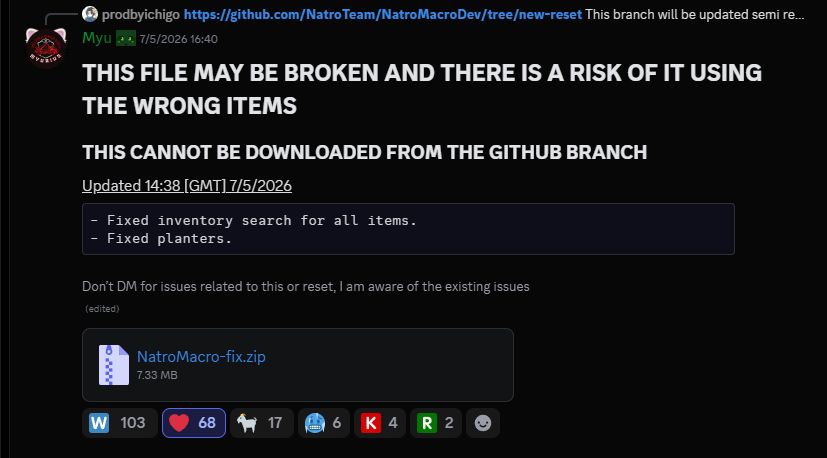
Newest (Fixed) Version [PLEASE READ]
Natro has been experiencing issues regarding detection [in multiple places like hive detection and planters] along with other issues due to roblox updates.
There's a temporary fix until the next full version is released, you can directly download it here or from the official message in the Natro Macro Discord
Still need help?
Join the official Natro Macro Discord server and open a help post in the ❗|get-help-here channel
Be patient, a helper will eventually solve your issue.